From a technical point of view, an electronic signature uses the principles of encryption (cryptography), i.e. the process of transforming input data (so-called plain text) into a form that is unreadable for an unauthorized person (so-called encrypted text). An integral part of encryption (and decryption) are keys.A key can be understood as any sequence of characters. According to its type, we distinguish symmetric and asymmetric cryptography.
Symmetric and asymmetric cryptography
Depending on whether the same key is used for encryption and decryption or different keys are used for both processes (systems), we distinguish between symmetric and asymmetric cryptography.
Symmetric cryptography
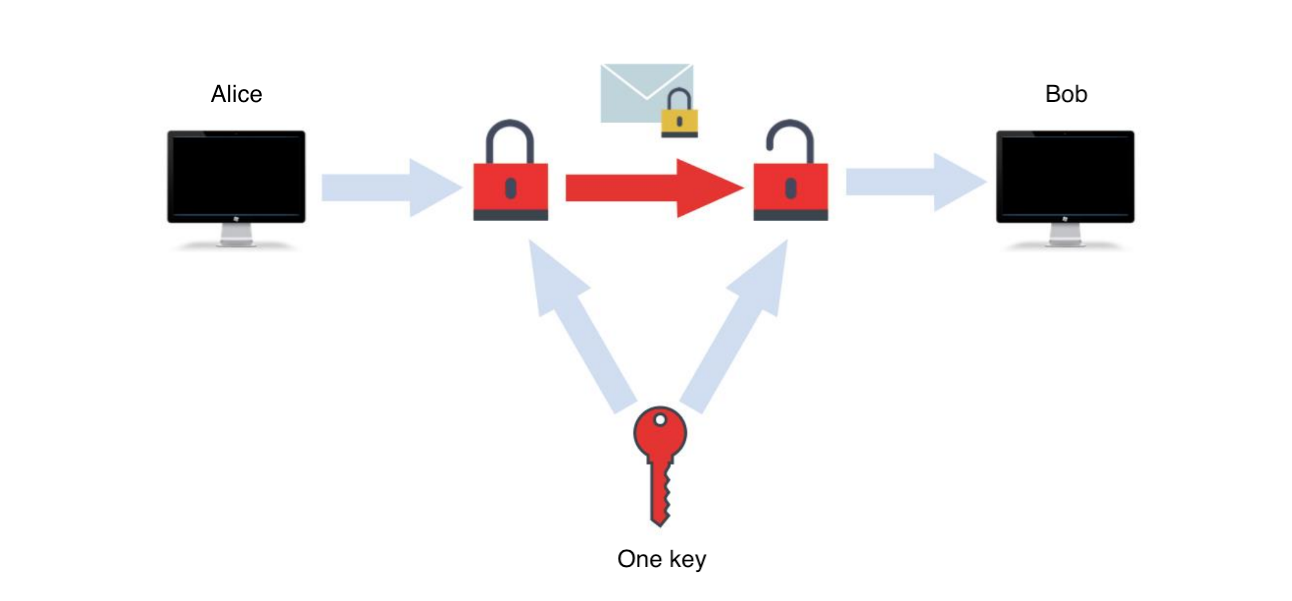
The same key is used for both encryption and decryption. The process itself is fast and the keys do not have to be as long as in asymmetric cryptography. However, it is necessary to solve the problem of secure key distribution.
The principle of symmetric cryptography - both parties have the same key. Source: our own image.
Asymmetric cryptography
Unlike symmetric cryptography, it uses two keys – a private and a public one.
The private key is known only to the recipient of the message.
The public key is known to the public and is freely available.
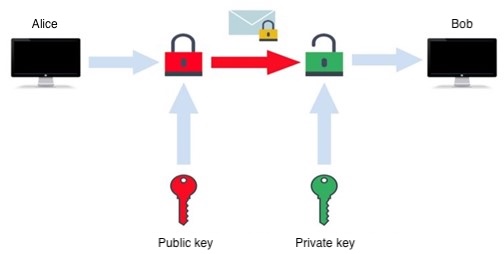
To send an encrypted message to the recipient with the certainty that only he and no one else can read it, we use his public key in the encryption process and send him the encrypted text. The recipient then decrypts the encrypted text using his private key, which is known only to him, and receives the original text.
Principle of asymmetric cryptography. Source: our own image.
In figure 4, to send a message to Bob with the certainty that only he and no one else will read it, Alice uses his public key to encrypt the message. The recipient (Bob) then decrypts the encrypted text using his private key, and receives the original text. An electronic signature uses this principle as well.
Encrypting sensitive documents
If you upload sensitive documents to the Internet (share them via email, store them in cloud storage, etc.), you need to encrypt them first with a strong enough password.
Microsoft 365 (Office)
You can encrypt documents created with Microsoft 365, formerly Office (Word, Excel, PowerPoint, etc.) directly when saving them in the "Information" category.
7-Zip
If you want to encrypt another sensitive document that wasn't created with Microsoft 365, formerly Office, you can use the file compression program 7-Zip to do so. You can set the archive to be password protected when compressing.
1. Right-click on the document and select "Add".
2. In the opened window, select the format in which you want to archive (we recommend zip format).
3. Enter a sufficiently strong password (e.g. use a guide to a secure password or generate one in Bitwarden).
Certificate
A public key certificate (abbreviated as certificate) is an electronic document issued by a certification authority that links a public key to a specific person. It is mainly used to verify the correctness of an electronic signature by verifying the public key and the identification data of its holder.
An analogy to a certificate can be the verification of signatures on a document by a notary. The notary issues a document that certifies the authenticity of these signatures. In other words, he certifies that the signature on the document belongs to a specific person.
A certificate has a limited validity period. After the validity period has expired or after the certificate has been revoked, the certificate may not be used, not for the purpose for which it was originally intended.
An independent authority (3rd party) is required to manage certificates.
Verifying a signed e-mail message in Outlook
An e-mail message that has been electronically signed is marked in the application with a seal symbol, see. the symbol marked in red in figure 5. Clicking on this symbol will display details such as the time of signing or the identity of the signer.
Where to verify an electronic signature. Source: our own image.