Secure password
Secure password
Recommendations for a secure password
- A password should be at least 12 characters long and should contain uppercase and lowercase letters, numbers, special characters (e.g.: +, ´, %, =, , *, /,…), and possibly diacritics.
- To make your password easier to remember, you can use a special sentence to help you, for example: The first apartment I have lived in was on Main street 8 for 300€/month.
You can use first letters of each word in the sentence and special characters to create your password: TfaIhliwoMs8f300€/m. You can play around with the password, add special characters to it, replace some letters with uppercase, etc. - Do not use the same password for multiple services and accounts.
- Do not write your passwords on paper. If you want to write down your password, hide it well away from your computer.
- The website Have I Been Pwned? provides verification using an email address to see if your password has been leaked and published in a database. If it has, don't use it for any other service and change it on all the services you use.
- If you want to keep your passwords stored on your computer, use a password manager. For example, use Bitwarden. When using a password manager, you only need to remember one strong password - the password for the program itself. You can have the password manager generate passwords for other applications and services.
How to Manage Your Passwords
Bitwarden
Bitwarden is a program used to generate and securely manage passwords for various services. It can be used on a computer, mobile phone, or as a browser add-on.If you need to access your passwords stored in Bitwarden, but you are not on your device (where you have the application or browser add-on installed), you can do this using this website, where you log in just as if you were using the application - using your email and password.
To create a new item, click on the plus, fill in the details, and save it by clicking on the floppy disk icon. You can enter the password that you currently use for the service, or you can have the password generated and then change the original password to the generated one in the service.
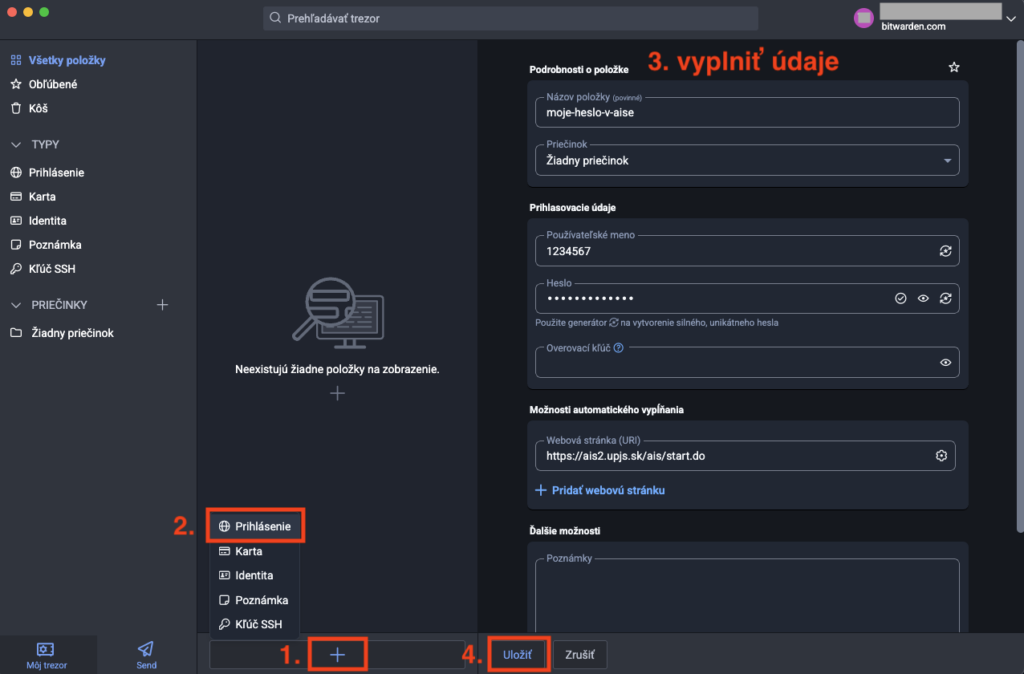
The advantage of password managers like Bitwarden is that they provide the ability to generate a password that is sufficiently long and random, but you don't have to remember it, because it is available everywhere, either through an app, plugin, or website. The only password you need to remember is the master password that you use when logging into Bitwarden and with which you access everything else. For this reason, you should make sure that your master password is secure..
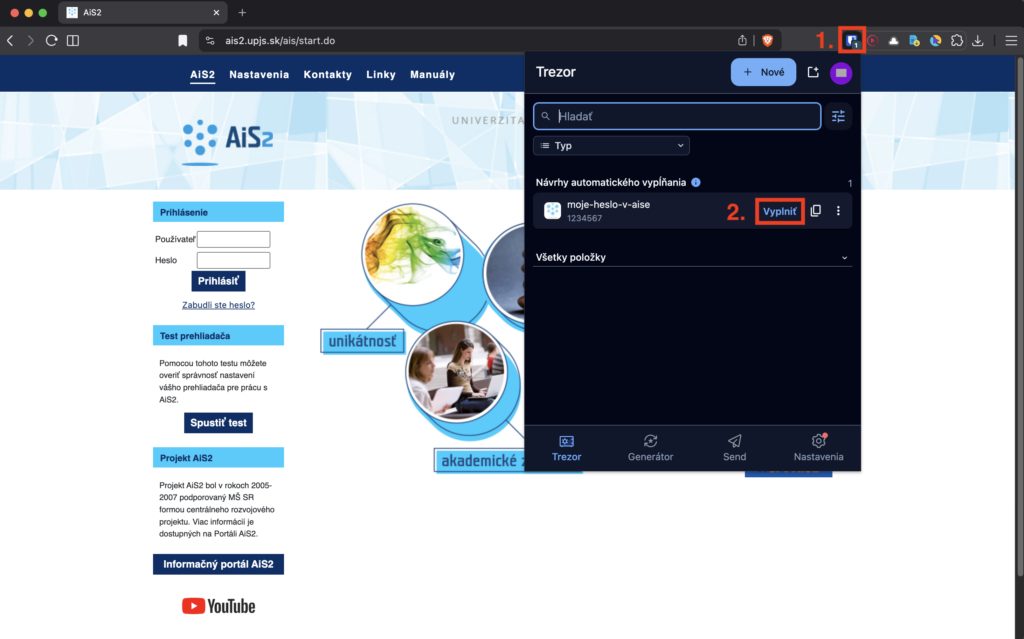
If you want to log in using an item stored in Bitwarden and you are using the app, you can log in to the app, open the item corresponding to the service, and copy the login name and password. If you have the Bitwarden plugin installed in your browser, it will automatically fill in your login information if you click on the corresponding item.