How to recognize phishing
How to recognize phishing
What is phishing?
Phishing emails are fraudulent messages that exploit psychological pressure and human emotions (fear, promise of reward, need to act quickly, submit to authority, etc.). Their goal is most often:
- To obtain your personal or login details (often by filling out a form)
- To force you to download and run an attachment that is infected (if it is an Office document, it often comes with a request that you not only run it in protected mode, but also allow editing, thereby allowing your device to be infected)
- To get you to click on a link (there, malware can be downloaded to your device automatically without your intervention)
What to do if you suspect that you have received a phishing email?
If you suspect you have received a phishing email, please follow these steps:
- Contact the CSIRT team
- Do not delete the email, as
– the email itself will not infect your device,
– if you delete it, we cannot investigate it - Do not click on any links in the email
- Do not download or run any attachments
What does a phishing email look like?
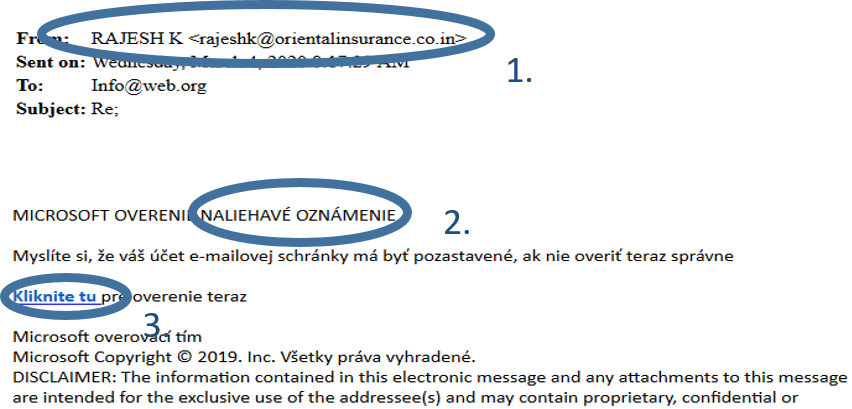
The following image shows an example of phishing. Note these signs:
- The email is sent from an unknown, dubious address. (This can help you recognize a fraudulent message, but it is not a rule. A fraudulent email can also come from one of your contacts, or even from your email address. An attacker can easily change the sender's address in the email to make it seem more trustworthy. Or one of your contacts may already have an infected mailbox and continue to spread phishing.)
- Abuse of authority, pressure
- Request to click on a link and fill in your personal information
- Bad grammar (This can be a sign of a fraudulent email, but it is not a rule, because automated translations have improved, or it can also be attackers who speak the language)