
Ways malware spreads
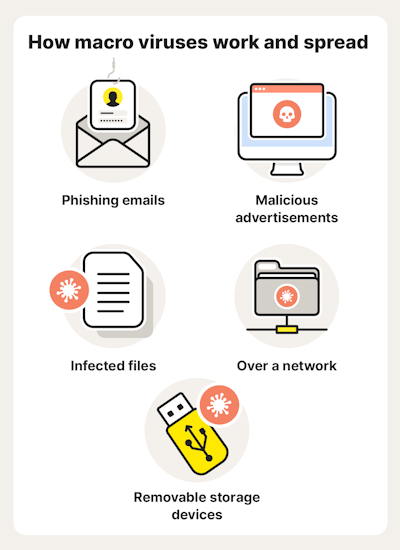
From an information security and malware protection perspective, it is important to understand the ways in which malware can spread. An attacker can spread malware using one or more of the following methods:
This is one of the oldest ways of spreading malware, which does not require a computer network.
Nowadays, it is necessary to pay particular attention to USB flash drives, which are a frequent gift item from various meetings, conferences, etc.
Another popular tactic is the so-called "USB drop attack", in which an attacker leaves an infected USB in publicly accessible places (parking lots, reception areas, company hallways) in the hope that someone will plug it into a computer out of curiosity.
Email messages are one of the most effective ways to spread malware. Anyone with an email account can be a potential target.
Various forms of social engineering (e.g. phishing, spear phishing) are most often used for this purpose.
Currently, every email service provider has at least basic protection against this method of malware distribution.
They are one of the fastest ways to spread malware. All an attacker needs to do is send a link to a malicious URL.
This method of malware distribution is directly related to the security of web servers, and at the same time, to the safe browsing of web content.
The attacker places the malware directly on a specific web address. They can send it to you directly or disguise it in various ways, such as in an image or another URL link that redirects you to a malicious page.
The page downloads malicious code to your device. In the worst case scenario, the code is directly executed.
Once malware is downloaded to a device, the malware can automatically replace or add additional malicious files to shared directories, ensuring further spread.
To get users to download and run files, malware uses enticing names, such as Windowscrack.exe, Nhl2018crack.exe.
Any software can contain bugs or vulnerabilities that can be exploited by attackers to infect devices.
How to protect yourself from malware
- Update your software and operating system: Keep your devices and software up to date with regular updates. This can help close security gaps that could be exploited by malware.
- Use strong passwords and two-factor authentication: Create strong and unique passwords for your accounts and enable two-factor authentication where possible.
- Be careful when opening attachments and clicking links: Be careful when opening attachments in emails or clicking links, especially from unknown senders.
- Using antivirus software: Install and regularly update reliable antivirus software on your device.
- Check and scan files: Before downloading or opening files from unknown sources, scan them with antivirus software or online services like VirusTotal, URLScan Hybrid Analysis, and Any.run.
- VirusTotal – an online tool that analyzes suspicious files and URLs to detect various types of malware. The tool is available at: https://www.virustotal.com
- Hybrid analysis – a free malware analysis service that detects and analyzes unknown threats using unique hybrid analysis technology. The tool is available at: https://hybrid-analysis.com/
- Any.run – an online malware execution tool. The tool is available at: https://any.run/
- URLScan – a free online service designed to scan and analyze web addresses (URLs) to detect potentially malicious or dangerous elements on those pages. Tool available at: https://urlscan.io/
What to do if you suspect malware
- Scan with antivirus software: : If you suspect a malware infection, it's important to scan your device with at least two antivirus programs, if possible. These tools can identify and remove malware.
- Contact your local administrator: For work or corporate devices, you should immediately contact your local administrator for a quick and effective resolution of the situation.
- Consult an expert: If you feel unsure or the situation requires a professional opinion, consulting an IT professional or security expert can be helpful.
- Reinstall the device and restore uninfected data from backup: In extreme cases, if the device is heavily infected, it may be necessary to reinstall the operating system. It is important to have backups of uninfected data that can be restored after the reinstallation.
- System Restore option in Windows:Windows includes a System Restore feature that allows you to revert the system to a previous state before a malware infection. This option can be useful, but it is not always completely reliable.